
2026-10-14
Build the desk you are allowed to feed
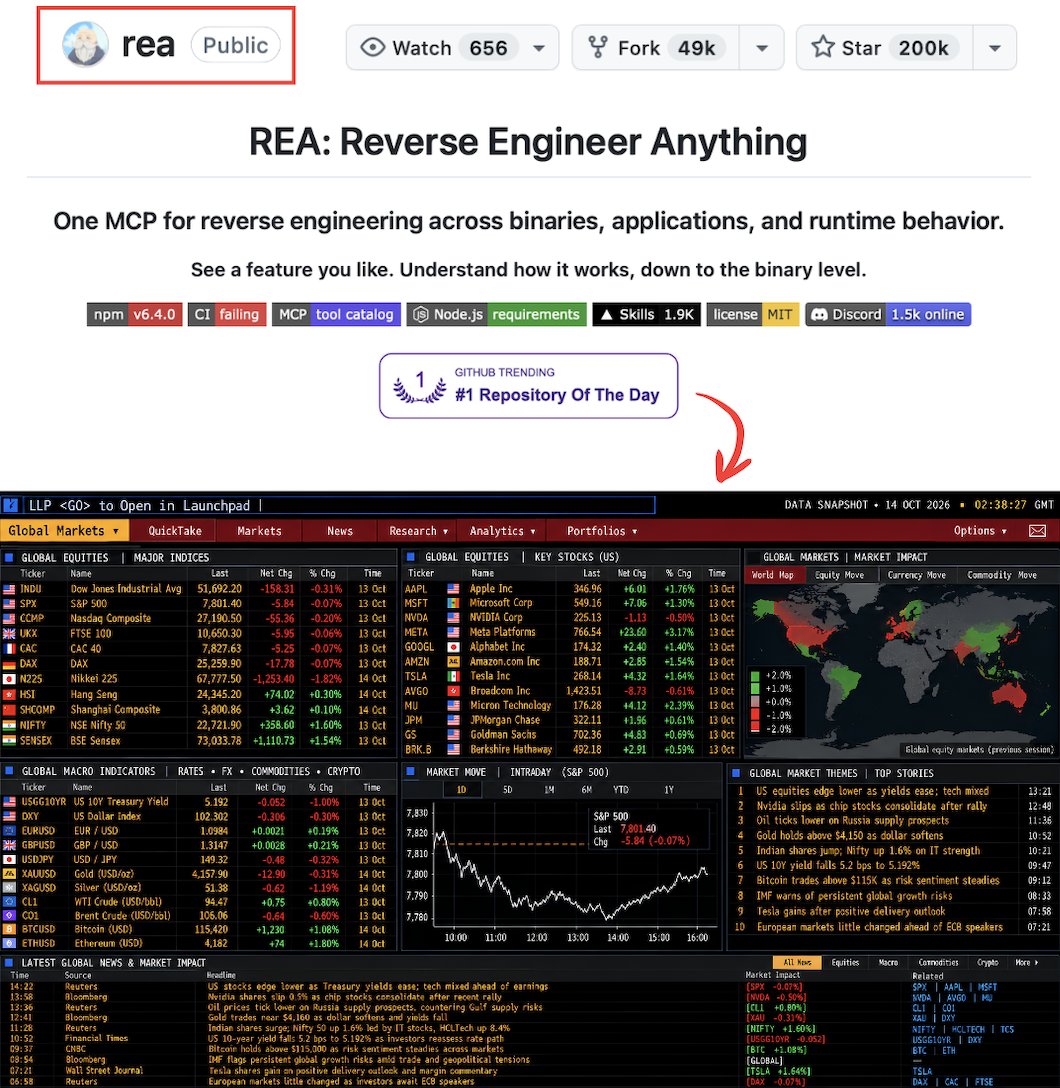
Roan (@RohOnChain) posted on 2026-10-13 at 18:50:26Z a Bloomberg-style terminal built with REA MCP (Reverse Engineer Anything). The post says earlier software got nuked, frames the result as about $24K/year of terminal used completely free, and then gives seven arrows for doing that kind of build with an AI agent. This page is the operator reading on rea.run: what to keep from the checklist, what the attached still actually shows, and the license line that sits in the same post. Chinese: /zh/blog/bloomberg-style-terminal-rea-mcp/.
REA here is the local MCP toolchain you pin and run on a machine you control. It can help an agent inspect software you are allowed to open and trace how a feature is put together. It does not ship equities, FX, crypto, commodities, or macro data. A dark UI with the same panel names as a professional terminal is a front end you write. Every number in a cell still needs a source you are allowed to call, store, and display.
What the snapshot supports
Two figures travel with this post, and both stay labeled. The engagement counts are an X API snapshot recorded for this page (counters move; a later read will differ). The dollar figure is the author framing in the post text, not an invoice and not a Bloomberg price list.
| Item | Value on this page | Source |
|---|---|---|
| Post | status 2110080740415394048 | Roan (@RohOnChain) |
| Created | 2026-10-13T18:50:26Z | Post timestamp |
| Impressions | ~21k | API snapshot in the source note for this page |
| Likes | 313 | Same snapshot |
| Reposts | 39 | Same snapshot |
| Bookmarks | 476 | Same snapshot |
| Replies | 32 | Same snapshot |
| Native video on the post | None (photo only) | Same source note |
| Author cost line | ~$24K/year, called completely free | Wording in the post |
Arithmetic on those inputs, and nothing else. Bookmarks minus likes is 476 − 313 = 163, so in this snapshot the post was saved more often than it was liked. Reading the author line $24K as 24000 dollars and dividing by 12 gives 2000 dollars a month. That quotient is a reading aid. It is not a seat price, an exchange fee, or a data-vendor quote. This page does not turn ~21k into an exact impression integer, and it does not print a Bloomberg list price the post did not print.
| Arithmetic | Inputs | Result | What it is |
|---|---|---|---|
| Bookmarks − likes | 476 and 313 from the snapshot | 163 | Gap inside one snapshot |
| Monthly reading of $24K | 24000 / 12 | 2000 dollars / month | Arithmetic on the author line |
| Seat price, exchange fees, redistrib. fees | Absent from the post | Left blank | Do not backfill |
The still and the walkthrough
The image under the title is the photo attached to the post, copied onto rea.run so the article does not depend on the social CDN. File: /media/blog/bloomberg-style-terminal-rea-mcp.jpg, 1060×1088. The X API returned that photo and no native video. The mp4 below is a 12.00 second Ken Burns pan-zoom made from the JPEG on this site (960×986, 30 fps, H.264, yuv420p, no audio). It is a UI screenshot walkthrough of the author terminal mock. It is not a live recording of REA.
Read the mock as a layout, not as a feed. Labels visible on the still line up with the workflows the author listed: a left nav (Overview, Security, News, Charts, Portfolio), asset-class chips (Equities, FX, Crypto, Macro, Cmdty), a search field, and panels for a security description, quotes, financial statements, news, a chart, and portfolio analytics. Sample rows and chart points are drawn on the mock. This page does not check them against any vendor and does not repeat them as market data.
| Region on the still | Author workflow it illustrates | Working when | Still a mock when |
|---|---|---|---|
| Search field | Security search | The query hits a catalog you are allowed to search, and the result cites that catalog | The box only filters a hard-coded list with no source line |
| Quote rows | Market quotes | Each row carries symbol, field, timestamp, and source name from a documented API | Prices are pixels with no payload behind them |
| Statement rows | Financial statements | Line items come from a filing or vendor response you may store | The table is a picture of another screen |
| News list | News | Items cite a publisher and a retrieval time | Headlines are placeholder strings |
| Chart | Charts / multi-asset charting | Series id, timezone, and source are on the panel | The path is decorative |
| Portfolio block | Portfolio analytics | Weights live in your code and prices come from the connector log | Weights are a screenshot |
| Equities, FX, Crypto, Macro, Cmdty chips | The five asset classes in arrow 3 | Each chip selects a connector you wrote | The chip only changes the paint |
Production pages use those /media/blog/ paths. The still and the clip are files in this repository. If the clip and the still disagree, trust the still: the clip is a camera move over one JPEG.
Read the opener next to arrow 6
The post opens with RIP Bloomberg Terminal, says the build used REA MCP after software got nuked, and calls the result a $24K/year terminal used completely free. The same post then tells the reader to connect Bloomberg BLPAPI only with the required access and permissions, and states that REA does not unlock Bloomberg proprietary data for free. Keep those sentences together. The free reading describes a UI and connectors you build. It does not describe a waived Bloomberg license.
| Line in the post | Operator reading |
|---|---|
| RIP Bloomberg Terminal | Rhetorical opener. A layout can resemble a terminal. The product terms stay the product terms. |
| Software got nuked | The author's description of an earlier build being removed. This page is not a restoration guide for a removed install. |
| ~$24K/year, completely free | Author cost framing. Pair it with arrow 6 before you repeat it. |
| REA MCP (Reverse Engineer Anything) | The toolchain the author credits. Pin it, run doctor, limit it to software you may open. |
| Seven arrows | The checklist below, paraphrased for a desk log. The post remains the source. |
| Try it in the article below | A pointer to a quoted post. The article URL returned 404 when unwound. This page stands alone. |
Authorization before a tool call
Inspection is allowed here only inside a written scope, on a machine you control. The interesting engineering (search, a quote row, a statement table, a chart series, a weight list) is available on a UI you are writing. A Bloomberg login is permission to use that service under its terms. If those terms forbid reverse engineering, stop. Do not point REA at a terminal binary, a leased network session, or someone else's credentials in order to recover a feed.
| Target | On this page | Stop |
|---|---|---|
| Terminal UI source you wrote | Map components, connectors, and tests | Keep API keys out of the prompt log |
| Open-source chart or data client whose license lets you read it | Trace and reimplement in your own words | Respect the license; do not republish a large verbatim tree |
| Your own recorded API responses, license allows storage | Build the historical store from those files | Record the clause that allows storage |
| BLPAPI on a machine where you already have the required access | Call it the way the entitlement allows | No session sharing, no bypass of an entitlement check |
| Bloomberg terminal binary, packet capture of a session, or a feed you are not entitled to | Out of scope | /faq/legal-boundary/ |
| License cracks, DRM bypass, credential theft | Out of scope | /compliance/ |
Preflight, in order:
- Write one sentence: owner, path, date, and whether any vendor key is in scope.
- Pin
npx -y [email protected](the teaching pin used on rea.run). Savedoctor --json. - For the Claude Code path the author asked for, also save
doctor --client claude_code --jsonanddoctor --skill --json. Client notes: /docs/mcp-clients/ and /docs/clients/. - Record SHA-256 of the tree you open.
- Put vendor keys and any BLPAPI credential outside the agent environment. A sample fixture you typed yourself needs no key.
- If the client caps MCP schema size, set
REA_MCP_INPUT_SCHEMA_PROFILE=compactand reconnect. See /blog/rea-agents-6-4-0/. - Read /blog/rea-agent-security-posture/ before the same machine holds production credentials.
The seven arrows as a desk checklist
The list below paraphrases the author arrows so you can tick them in a log. It is not a paste of the post. Arrow 6 is a gate, not a footnote.
| # | Arrow, paraphrased | Artifact you keep | Fail closed when |
|---|---|---|---|
| 1 | Install REA, connect its MCP to Claude Code, investigate authorized software, trace how features work | doctor JSON + Evidence with path:line | The target is a product you are not allowed to inspect |
| 2 | Map security search, market quotes, financial statements, news, charts, portfolio analytics | A workflow table with a file or module for each | A panel has no location in your tree |
| 3 | Independent connectors for equities, crypto, forex, commodities, macro, via documented APIs | One module per asset class, source name on every row | The connector scrapes a session you may not automate |
| 4 | Use Opus 5.5 for the UI, live pipelines, historical databases, multi-asset charting | A pinned model id and a diff you reviewed | The model held a vendor key or invented a print |
| 5 | Screeners, yield curves, factor models, portfolio analytics, a Python backtest engine | Tests on fixtures you wrote; costs and time split if you backtest | A performance number with no log |
| 6 | BLPAPI only with required access and permissions; REA does not unlock Bloomberg proprietary data for free | An entitlement line, or an explicit "BLPAPI absent" | Any step treats REA as a data license |
| 7 | Test every module, verify accuracy, track licensing, ship a working terminal rather than a static mock | A ship row per module | The UI renders with no payload and is called done |
1. Install REA and connect Claude Code
Install from the site guide /docs/install/. The author asked for REA MCP attached to Claude Code. On this site the client id is claude_code. Setup registers MCP; skills can land in a directory Claude Code does not auto-load, which is why the doctor checks are separate. Investigation shape, once the tools answer: Plan, Trace, Verify, Report on /showcase/rea-investigate/.
npx -y [email protected] setup
npx -y [email protected] doctor --json
npx -y [email protected] doctor --client claude_code --json
npx -y [email protected] doctor --skill --json
A first prompt that matches this page (edit the path; do not widen it to a vendor binary):
Authorization: I own /abs/path/to/my-terminal-ui (source) on this machine. Date 2026-10-14.
Pin: [email protected]. Use REA MCP. Return Evidence with path:line.
Questions: where a quote row is built, where a news row is built, where a chart series is built.
List unknowns. Do not call a vendor I have not named.
Do not request Bloomberg fields, a BLPAPI session, or a license bypass.
Pass looks like a path and a function. Fail looks like a paragraph about how markets work with no location. Chat prose does not upgrade itself to Evidence (/blog/evaluating-rea-claims/). REA does not ship a decompiler. Ghidra, JEB, and IDA stay bring-your-own and licensed, and they are unnecessary while the artifact is source you wrote.
2. Map the six workflows
Arrow 2 is a map, not a feed. Fill one row per workflow before any panel is called finished. The Overview screen on the still is a composite: it shows several of these at once. Security, News, Charts, and Portfolio are the same workflows on their own routes.
| Workflow | Question for the agent | You should be able to file |
|---|---|---|
| Security search | Which function turns a query string into a list of instruments? | Path, the catalog it reads, unknowns |
| Market quotes | Which function maps a payload into bid, ask, last, and time? | Field list and the source key |
| Financial statements | Which function maps a statement payload into rows? | Line-item keys and the period field |
| News | Which function maps a headline payload into the list? | Publisher, time, url or id fields |
| Charts | Which function turns points into the series the canvas draws? | Series id, timezone, gap policy |
| Portfolio analytics | Which function reads weights and marks them? | Weight field and the price source |
3. Independent connectors on documented APIs
Arrow 3 names five asset classes and one constraint: documented APIs. A documented API is a vendor or publisher interface you are allowed to call, with a public contract (REST, WebSocket, file drop, or an official SDK). The mock chips say Equities, FX, Crypto, Macro, and Cmdty; the post says equities, crypto, forex, commodities, and macroeconomic data. Same five buckets.
| Bucket | Examples of a lawful source | You record | Out of scope |
|---|---|---|---|
| Equities | Broker or market-data API whose docs you can cite, and whose key you hold | Vendor name, field names, timestamp basis | A terminal screen scrape |
| Forex | A documented FX API on an account you control | Pair symbol convention | Another person's session |
| Crypto | Exchange market-data docs for an account or a public endpoint the exchange documents | Which endpoint, which symbol format | Undocumented private hosts |
| Commodities | A documented commodity or futures API you may call | Contract code and timezone | A copied curve from a restricted PDF |
| Macro | A statistical agency or vendor series you may store | Series id and revision policy | A paywalled table pasted into the repo |
Connector rules:
- One module per bucket. The UI chip calls that module. It does not embed numbers.
- Every returned row includes
source(a name you chose for the vendor) andretrieved_at. - The historical store is a directory of responses you were allowed to save, plus a SHA-256. Write the license clause that allows storage, or mark storage unknown and do not commit the payload.
- Keys stay in an environment the agent cannot read. Fixtures used in tests are tiny JSON files you wrote.
- REA can help you trace your module. It is not the source of the prints.
Shape only. vendor_payload is whatever your licensed client already parsed. This function does not know a market:
def quote_row(symbol, vendor_payload, entitlement):
    if entitlement != "documented-api":
        raise PermissionError("missing entitlement")
    return {
        "symbol": symbol,
        "bid": vendor_payload["bid"],
        "ask": vendor_payload["ask"],
        "source": vendor_payload["source_name"],
        "retrieved_at": vendor_payload["retrieved_at"],
    }

def test_refuses_blank_entitlement():
    try:
        quote_row("EXAMPLE", {"bid": 1, "ask": 2, "source_name": "fixture", "retrieved_at": "t"}, "")
    except PermissionError:
        return
    raise AssertionError("blank entitlement must fail")
The numbers 1 and 2 in the test are fixtures so the exception path can be checked. They are not quotes.
4. Opus 5.5 builds the shell, you keep the keys
Arrow 4 assigns the UI, live-data pipelines, historical databases, and the multi-asset charting engine to Opus 5.5. That is the author wording. Pin the vendor model id you actually call, and write that id into the log. If the id you have is different, record the difference. The model drafts files. You merge them. A fluent draft of a chart component is not a data license and not Evidence.
| Piece | Who | Owns | Does not own |
|---|---|---|---|
| Observation of your UI | REA MCP | Paths, fields, unknowns | A market print |
| Writer | The model id you pin (author text: Opus 5.5) | A diff of UI, pipeline, store, chart | API keys, BLPAPI sessions, permission |
| Connectors | Your code | Documented-API calls and fixtures | An implicit Bloomberg feed |
| Human | You | Authorization, the entitlement line, reading the diff | Blind trust of model prose |
Writer contract you can paste above the prompt:
Draft only inside the repository I named.
UI, pipeline, store, and chart must read rows that already carry a source name.
Leave unknowns listed. Do not invent bids, headlines, or statement lines.
No API keys. No BLPAPI. No license bypass.
If the authorization line is missing, refuse the task.
A second session for the REA lane is a separate community pattern: /blog/rea-dual-agent-worktree/. Use it when you want the tool transcript off to the side. It does not change the license gate.
5. Screeners, curves, factors, portfolio, backtest
Arrow 5 is a set of modules on top of arrow 3. Each one is code plus a fixture. None of them is a performance claim. This page prints no Sharpe, no CAGR, no win rate, and no profit figure. Method for costs, time splits, and a paper-only gate lives on /blog/rea-trading-research-desk/.
| Module | Minimum artifact | Fails when |
|---|---|---|
| Screener | A predicate over fields you store, plus a three-row fixture with expected pass and fail | A field has no source |
| Yield curve | Tenor, rate, and source in a table your code loads | The curve is a picture with no series id |
| Factor model | Factor names and a formula in your repo, tested on a fixture you wrote | Coefficients copied from a document you may not republish |
| Portfolio analytics | Weights in code; a test that they sum to 1 within a tolerance you set; marks from the connector | Weights exist only on the mock |
| Python backtest | The trading-desk procedure: fee grid, slippage note, chronological split, paper-only | Parameters chosen to decorate a chart |
A screener fixture has no market behind it:
def passes_screen(row, min_volume):
    return row["volume"] >= min_volume and row["source"] != ""

def test_screen_fixture():
    assert passes_screen({"volume": 10, "source": "example-vendor"}, 5)
    assert not passes_screen({"volume": 10, "source": ""}, 5)
10, 5, and the empty source are inputs you can see in the test. They check the predicate. They do not describe a security.
Chart gate for the multi-asset engine: one series id, one timezone, one missing-point policy (gap or carry, written down), and the same source string the connector logs. A path with no series id stays labeled mock, including the chart drawn on the author still until your tree meets the gate.
6. BLPAPI only with access you already have
Arrow 6 is the author's own constraint, and it is the constraint this page repeats: connect Bloomberg BLPAPI only with the required access and permissions; REA does not unlock Bloomberg proprietary data for free. BLPAPI is an official API. Using it means you already have whatever Bloomberg and your firm require for that API (license, entitlement, network, and permission to call it from your process). REA does not grant that entitlement, does not extract it from a terminal install, and does not replace it with a lookalike UI.
| Situation | What you may do | What you write in the log |
|---|---|---|
| You have BLPAPI access and permission to call it | Follow Bloomberg documentation for that API. Keep the credential out of the agent. | blpapi: enabled, plus where the entitlement lives (account, not the secret) |
| You do not have that access | Build the panel on a documented API you may call. Label the source. | blpapi: absent |
| You have a terminal login and want the same fields in your app | Use the path your contract allows. If the contract points you at BLPAPI, use BLPAPI. If it forbids export or reverse engineering, stop. | The clause you relied on, or stopped |
| A model offers to recover proprietary fields without an entitlement | Refuse the diff. | evidence_gap / license stop |
A working panel can look like the still and still be honest: Equities from vendor A, FX from vendor B, crypto from an exchange you documented, macro from a series you may store, commodities from a futures API you may call, and Bloomberg fields only on the rows where blpapi: enabled is true. Mixing those sources without labeling them is how a mock starts to impersonate a terminal.
7. Test, accuracy, licensing, then ship
Arrow 7 draws the line between the still and a terminal. The still is a UI mock with panels in the right places. Shipping means each module has been run against a payload you are allowed to hold, the fields were checked, and the license is written down.
- For each module, name the command you ran and the fixture or response file (hash included).
- Accuracy check: compare a field to the vendor's own documented response for a symbol you may query. Record match or mismatch. Do not publish the vendor payload if the license forbids it; publish the pass/fail and the field name.
- Licensing row: vendor, whether redistribution is allowed, whether storage is allowed, and the BLPAPI line (
enabledorabsent). - A module with a blank
sourcefails, even if the pixels look finished. - UI that renders from hard-coded rows stays labeled static mock.
- If you add orders, keep them paper-only and follow the risk gate on the trading research desk. No order key in the agent.
- A person reads the ship table before anyone describes the result as a working terminal.
| Check | Static mock (the still, until proven otherwise) | Working module |
|---|---|---|
| Data origin | Drawn on the image | Payload from a documented API or a fixture you wrote |
| Source label | Optional decoration | Required on the row |
| Accuracy | Not claimed | Field-level match or mismatch recorded |
| License | Not recorded | Storage and redistribution filled in |
| BLPAPI | Not demonstrated by the JPEG | enabled with access you have, or absent |
| Agent keys | Unknown | Confirmed absent from the session |
| Ship word | Screenshot walkthrough | Allowed only after the rows above are filled |
Log row you can imitate (a form, not an outcome): experiment_id 2026-10-14-001, authorization "I own the terminal UI repo", rea_pin [email protected], model_id the Opus 5.5 id you pinned or different-id, blpapi absent, decision mock, unknowns "no documented API chosen yet". No prices, no monthly dollar claim of your own.
Kept out of this page
- No procedure for restoring software the author described as nuked.
- No disassembly, memory dump, or packet capture of a Bloomberg terminal.
- No entitlement bypass, shared login, or scraped session.
- No proprietary field list presented as something REA can reveal for free.
- No verified market prints from the mock, and no backtest result.
- No claim that rea.run hosts the author application. The post invited readers to try a terminal via an article; that article did not resolve.
The quoted article did not resolve
The post points readers at a quoted post, How to Build the Most Powerful AI Trading System (Hedge Fund Infrastructure) (status 2109650293365305427). Unwinding the article link 2108476696093728768 returned 404. This page does not depend on that article, does not reconstruct it, and does not treat the 404 as a mirror to go find. The checklist above is the part that was in the note itself.
Operator FAQ
| Question | Answer |
|---|---|
| Can REA replace a Bloomberg subscription? | REA does not unlock Bloomberg proprietary data for free. A similar UI still needs data you are allowed to call. BLPAPI stays behind access you already have. |
| Is the clip a recording of REA? | It is a 12-second pan-zoom of the author still. The source post had a photo and no native video. |
| Where is the terminal the post said to try? | The article URL returned 404. This page does not host the author app. |
| Which software may I inspect? | Software you own, open-source the license lets you read, or a target under written permission, on your machine. |
| Does a terminal login allow reversing the terminal binary? | A login is use under the product terms. If those terms forbid reverse engineering, stop. |
| Which model builds the UI? | The author wrote Opus 5.5. Pin the id you actually call. You review the diff. Keys stay out. |
| What counts as shipped? | Modules tested, a source on every data cell, licensing written down, working path rather than a static mock. |
| Did you re-measure the engagement counts? | The table is the API snapshot supplied with this page. It is not a live counter. |
On rea.run
| Topic | Page |
|---|---|
| This guide in Chinese | /zh/blog/bloomberg-style-terminal-rea-mcp/ |
| Install | /docs/install/ |
| MCP clients, including Claude Code | /docs/mcp-clients/ |
| Client matrix | /docs/clients/ |
| Investigation skill | /showcase/rea-investigate/ |
| Trading research desk (costs, paper trading) | /blog/rea-trading-research-desk/ |
| 6.4.0 pin and compact schema | /blog/rea-agents-6-4-0/ |
| Evidence over hype | /blog/evaluating-rea-claims/ |
| Security posture | /blog/rea-agent-security-posture/ |
| Session isolation pattern | /blog/rea-dual-agent-worktree/ |
| Legal boundary | /faq/legal-boundary/ |
| Compliance | /compliance/ |
Sources
- Post: Roan (@RohOnChain), status 2110080740415394048, created 2026-10-13T18:50:26Z.
- API snapshot used above: ~21k impressions, 313 likes, 39 reposts, 476 bookmarks, 32 replies. Photo only.
- Author cost line: ~$24K/year, described as completely free. Monthly reading 24000/12 = 2000 is arithmetic on this page.
- Author license line, paraphrased in the checklist: BLPAPI only with required access and permissions; REA does not unlock Bloomberg proprietary data for free.
- Quoted post: 2109650293365305427. Article 2108476696093728768 returned 404 when unwound.
- Hosted still:
/media/blog/bloomberg-style-terminal-rea-mcp.jpg(1060×1088). Hosted walkthrough:/media/blog/bloomberg-style-terminal-rea-mcp.mp4(12.00 s, 960×986, H.264, yuv420p). - Tooling pin and client checks: /docs/install/, /docs/mcp-clients/.
Desk rule for this build: authorized software on your machine, documented APIs you may call, BLPAPI only when the access is already yours, and a source name on every cell before the word terminal is allowed. The mock is a layout to learn from. The license line in the same post is the part that keeps the layout honest.