
2026-10-16
From zero to a first REA run: install, Evidence, first Electron task

This is the operator beginner guide for REA (Reverse Engineer Anything) on rea.run. Goal: install, verify with Evidence, and finish one engine-free Electron / JavaScript task on a target you are allowed to analyze. Teaching pin on this site: [email protected]. Chinese twin: /zh/blog/rea-beginner-guide/. Companion version deep-dive: /blog/rea-agents-6-5-0/.
What you will leave with
| Checkpoint | Pass criterion |
|---|---|
| Node | node -v shows 22.19+, 24.11+, or 26+ (not 23 / 25 / preview) |
| Pin | You can run npx -y [email protected] doctor --json |
| Restart | Your MCP client was fully quit and reopened after setup |
| First job | An engine-free analyze-javascript-application (or Agent skill) returns JSON/MD on an authorized path |
| Evidence habit | Every claim you keep has a location / digest / unknown list |
| Compliance | Target is own / authorized / clean-room — /compliance/ · /faq/legal-boundary/ |
Shortest path (bookmark this): install a supported Node → npx -y [email protected] setup → doctor --json → restart the Agent → analyze one Electron / JS app you may inspect → read Evidence → only then decide on Hopper / Ghidra / IDA. Interactive install walkthrough: /docs/install-demo/. Hands-on lab: /lab/.
1. What REA is

Reverse engineering means opening a finished thing to see how it was built — toys with gears, or a packaged program file. Useful when you own the software, hold a written authorization, or work a clean-room / licensed fixture. Unauthorized commercial reverse-engineering is out of scope on this site (/faq/legal-boundary/).
MCP (Model Context Protocol) is a standard way to give an AI agent *hands*: printers, calculators, file cabinets — here, reverse-engineering tools. Without MCP, the chat can only ask you to paste text.
REA sits in the middle. Left: your Agent (Claude Code, Codex, Cursor, and others on the /docs/clients/ matrix). Right: Hopper, Ghidra, IDA (bring-your-own for native binaries). REA is an MCP server / CLI that translates agent intent into tool calls and returns Evidence-backed results in plain language. Upstream positions itself carefully: it is not a new decompiler — it is the interface layer. Tool repo: morluto/rea. npm package: rea-agents.
| Classic RE tools (Ghidra, IDA) | Web chat alone | REA + Agent | |
|---|---|---|---|
| Who operates | You; you must read assembly | Talk only; cannot touch local files | Agent drives tools |
| No source available | Can disassemble; you digest output | Stuck | Can inspect + narrate in plain language |
| Are conclusions checkable? | You judge | May invent confidently | Each claim ships with Evidence / unknowns |
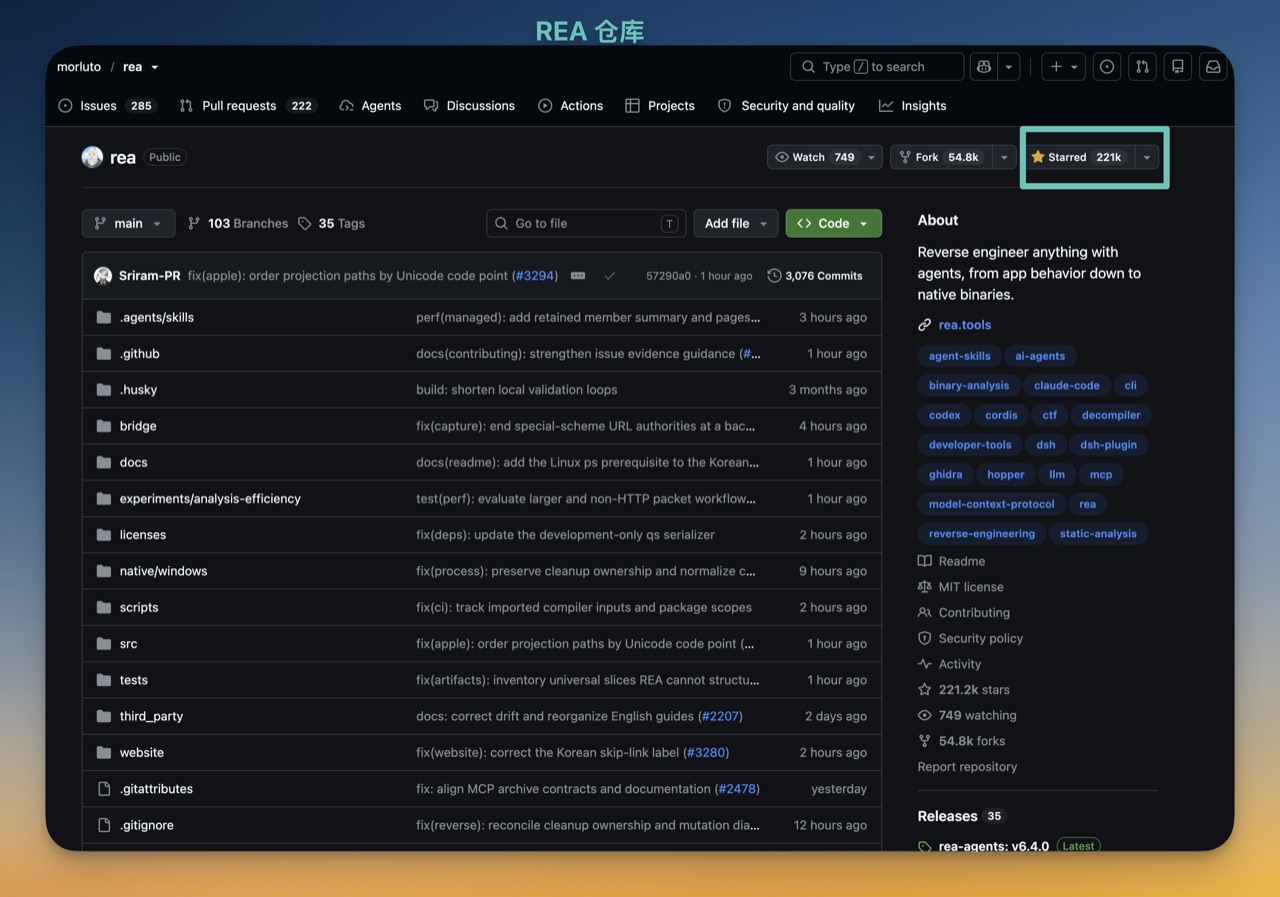
Discovery signal only (not an install SLA): the public morluto/rea repository showed roughly 275k GitHub stars and 69k forks on a 2026-10-16 GitHub API snapshot (created 2026-04-14). Counters move — re-fetch before you quote. Stars ≠ permission and ≠ doctor-green on your box (/blog/evaluating-rea-claims/).
2. What it can and cannot do

Can do (by how much extra you install)
| Tier | Targets | Extra engines? |
|---|---|---|
| Easiest | JavaScript / Electron apps, sites, SQLite DBs, web archives, packages / resources | None — Node + rea-agents |
| Medium | Native binaries (Mach-O, ELF, PE, macOS .app), Go, .NET, WASM, EVM bytecode, Linux crash dumps | One analysis engine (Hopper / Ghidra / IDA) |
| Specialist | Android APK + device, firmware, packet captures, recorded logic signals, JEB projects, Flutter apps | Target-specific companions (ADB, JEB, Wireshark, …) |
Beginners: stay on the first tier. Electron apps (VS Code, Notion, many desktop tools) are web tech wrapped as desktop software — lowest friction, no Hopper required. Try /lab/dino-speed/ or /lab/calculator-percent/ after install if you want a guided exercise.
Cannot do
- It does not hand you original source. Output is decompiler / analyzer reconstruction: logic can be real; names like
local_18/sub_401230are guessed. - REA analyzes locally — the target file does not upload through REA. Your Agent’s model vendor still has its own data policy; treat that as a separate line.
- It teaches “understand,” not “copy-paste ship.” Rebuild in your own words and assets under authorization — see /compliance/.
3. Download and install

Prefer CLI first — error messages are blunt — then register the Agent. Official install docs on this site: /docs/install/ · demo flow /docs/install-demo/.
Step 1 — Node.js
Supported bands are strict: 22.x ≥22.19, 24.x ≥24.11, or 26+. Node 23 and 25 (and previews) are refused. Setup will not upgrade Node for you, and will not install Java / Python for engines.
node -v
# expect 22.19+, 24.11+, or 26+
# nvm example:
nvm install --lts
nvm use --lts
Step 2 — one command setup (pin 6.5.0)
npx -y [email protected] setup
# interactive: pick clients, optional Hopper, review plan, approve
npx downloads and runs without a global install — cleanest for first tries. Global alternative:
npm install --global [email protected]
rea --help
Step 3 — what setup asks
| Client (examples) | Value you select |
|---|---|
| Claude Code | claude_code |
| Codex | codex |
| Cursor | cursor |
| Gemini CLI | gemini_cli |
| VS Code | vscode |
Full client matrix (twenty-ish ids, including newer 6.5.0 rows): /docs/clients/. Detected ≠ auto-checked — already-installed REA stays selected; newly seen clients are listed without forcing a checkmark.
Second question: optional Hopper on Mac (paid vendor tool). Decline on first pass — tier-1 work does not need it. Third: review the plan (files, commands, downloads) and approve. Two approvals are normal: npm download once, then REA config changes once. Dry-run first if you want:
npx -y [email protected] setup --client codex --dry-run
Step 4 — three things after install
1. Doctor (read-only):
npx -y [email protected] doctor --json
# scoped examples:
npx -y [email protected] doctor --provider ghidra --json
npx -y [email protected] doctor --client codex --json
healthy: false often means “something on the full matrix is missing,” not “you cannot run tier 1.” Scope the check to the client / provider you actually use.
2. Restart the Agent completely. MCP registration is written to config files; a live session will not see it until restart. Classic symptom: doctor green, chat says “no such tool.”
3. Engine-free smoke test (absolute path; authorized target only):
npx -y [email protected] analyze-javascript-application "/ABS/PATH/TO/YourApp.app" --json
# Electron ASAR example shape (macOS), when you may inspect that copy:
# npx -y [email protected] analyze-javascript-application \
#   "/Applications/YourApp.app/Contents/Resources/app.asar" --format json \
#   --integrity-policy=record-and-continue
If you hit artifact_integrity_mismatch on apps with signed native .node addons, --integrity-policy=record-and-continue records the mismatch and continues — common on some Electron desktops. That is a packaging reality, not proof you installed wrong.
Update / uninstall
rea update                         # if installed globally
npx -y [email protected] setup      # refresh npx / re-register
rea uninstall                      # remove REA-written config + skills
rea uninstall --purge-data         # also drop REA cache/state
Uninstall leaves Hopper, Node, your captures, and other MCP servers alone.
4. Choosing analysis engines

You can skip engines entirely for JS / Electron / site / SQLite work. Engines are for native machine code. Correct order: prove the agent loop on tier 1, then pay tuition for binaries.
| Hopper | Ghidra | IDA | |
|---|---|---|---|
| Cost | Commercial; limited trial | Free / open source | Commercial (usually most expensive) |
| Who | Vendor product | NSA-origin open release | Long-standing commercial RE suite |
| Install | REA can assist on Mac | You install JDK + Ghidra; tell REA the path | Follow vendor docs; BYO |
| Fits | Mac users wanting less friction | Zero budget, willing to DIY | Pros who already license it |
Install one. When several can handle a job, pass --provider / provider_id or the tools do not know whom to call. Setup vs providers FAQ: /faq/setup-vs-providers/. Ghidra notes: /blog/ghidra-mcp-with-rea/.
Ghidra (free path)
export GHIDRA_INSTALL_DIR=/path/to/ghidra_12.1.4_PUBLIC
export JAVA_HOME=/path/to/jdk-21   # optional if java already on PATH
npx -y [email protected] doctor --json
npx -y [email protected] setup      # persist paths
Upstream teaching pins often name Ghidra 12.1.x and JDK 21+ (64-bit, with javac). REA does not download Ghidra or Java for you.
Hopper (Mac convenience)
On Mac, setup may offer Hopper: download official package, verify size/digest, install under ~/Applications/, then open for trial or license. No Homebrew / admin required for that path. Uninstalling REA does not remove Hopper. Trial limits are vendor-defined. macOS automation prompts live under System Settings → Privacy & Security → Automation.
Startup timeouts
export REA_HOPPER_STARTUP_TIMEOUT_MS=300000
export REA_GHIDRA_STARTUP_TIMEOUT_MS=300000
Set these in the layer that starts REA. Also raise your Agent’s own request timeout — REA waiting does not help if the client hangs up first.
5. First task (engine-free Electron / JS)

Pick a desktop app you may analyze (your build, licensed fixture, written authorization). Path must be absolute. Relative ./app forms fail.
npx -y [email protected] analyze-javascript-application /Applications/YourApp.app --json
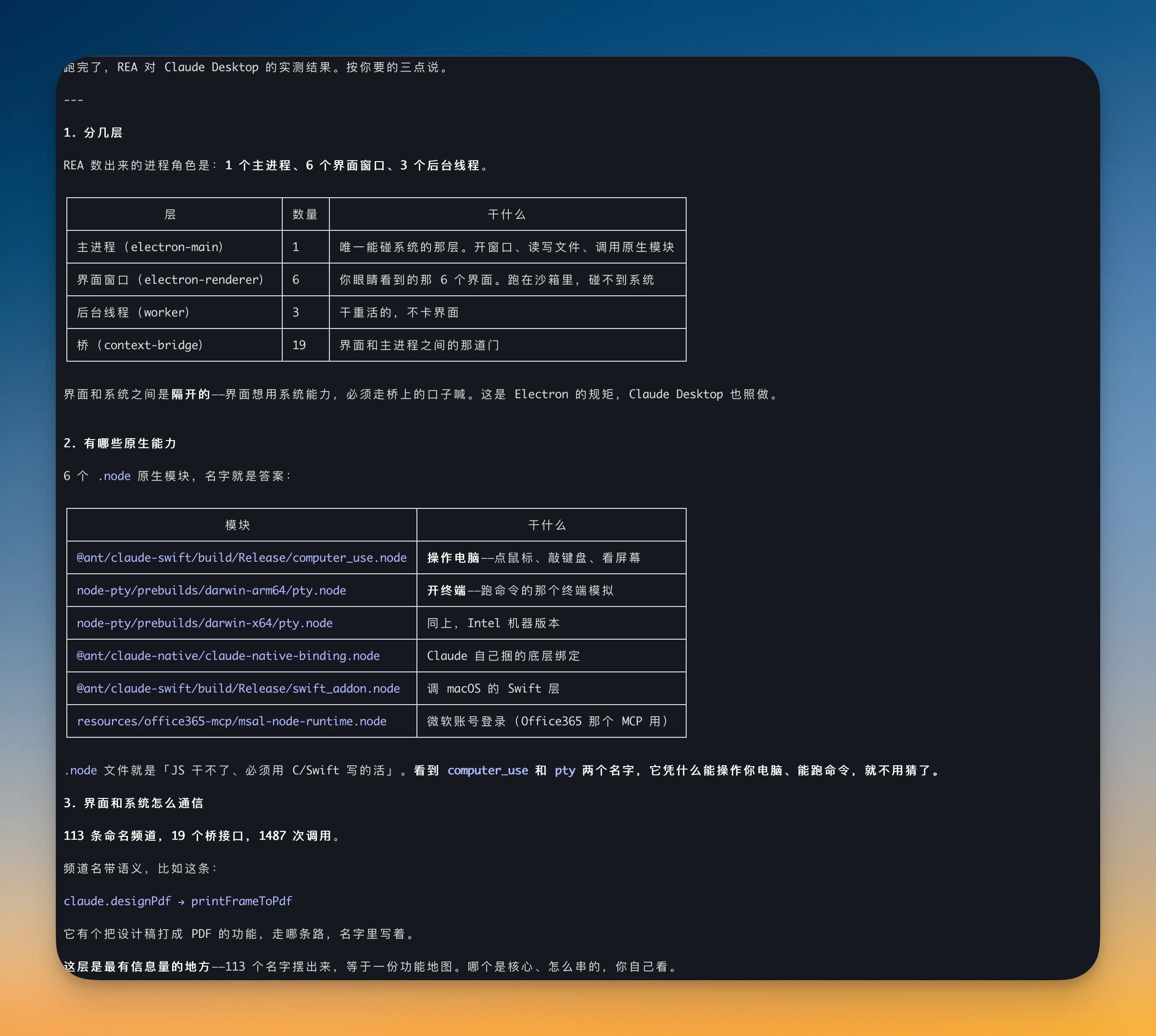
Read the JSON for: module inventory, import / dependency edges, and Electron boundaries — renderer (UI), preload (bridge), main (system powers). UI cannot touch OS APIs directly by default; it calls across the preload bridge into main. Marking those bridges is the teaching win for tier 1.
Illustrative scale from one authorized Claude Desktop ASAR pass (operator lab notes — your numbers will differ; do not treat as a universal SLA): hundreds of files, thousands of findings, named native addons (e.g. computer-use / pty-style .node modules), and dozens to hundreds of IPC channel names. Large files may appear under limitations when heap caps truncate facts — that honesty is a feature.
npx -y [email protected] analyze-javascript-application \
  "/Applications/YourApp.app/Contents/Resources/app.asar" \
  --format md --integrity-policy=record-and-continue \
  > ~/Desktop/analysis.md
REA prints to the terminal; it does not auto-save a report. Redirect yourself. --format accepts md, json, yaml, jsonl. Narrow with --filter-output statistics,summary when you only need a slice. For 6.5.0 precise path selection and retained Evidence paging, see /blog/rea-agents-6-5-0/ rather than duplicating that guide here.
6. Evidence — the valuable part

Upstream design principle #1 is Evidence-first: every claim should say *why* — file offset / path, digest, JSON pointer — and separately list what this run could not determine. Most tools only shout discoveries; REA also reports gaps.
Why operators care: language models invent confident answers when uncertain. In chat that is awkward; in reverse engineering it burns hours. Evidence turns “trust me” into “verify me.” Still: Evidence is tool output — tools err. Value is checkability, not infallibility (/blog/evaluating-rea-claims/).
7. Let the Agent drive
CLI proves the pipe. Production usage is the Agent calling MCP tools with skills loaded. Setup writes both the MCP registration and the skill / playbook. Skills without MCP (or the reverse) leave the agent half-armed.
# skills-only refresh if MCP already registered:
npx skills add morluto/rea --skill reverse-engineer-anything
Prompt pattern that matches how REA wants to be used:
Inspect [authorized target] for [feature].
1. Explain how it works in plain language
2. Attach Evidence for each claim
3. List what you could not determine
4. Then implement *my* version of the idea in *my* repo
Always ask for the unknowns list. For huge ASAR / graphs, prefer writing results to disk then analyzing slices — otherwise agent context explodes (see token FAQ on this site). Security posture for agent labs: /blog/rea-agent-security-posture/.
8. Three showcase-scale examples
These show resolution — not permission to analyze arbitrary commercial apps.
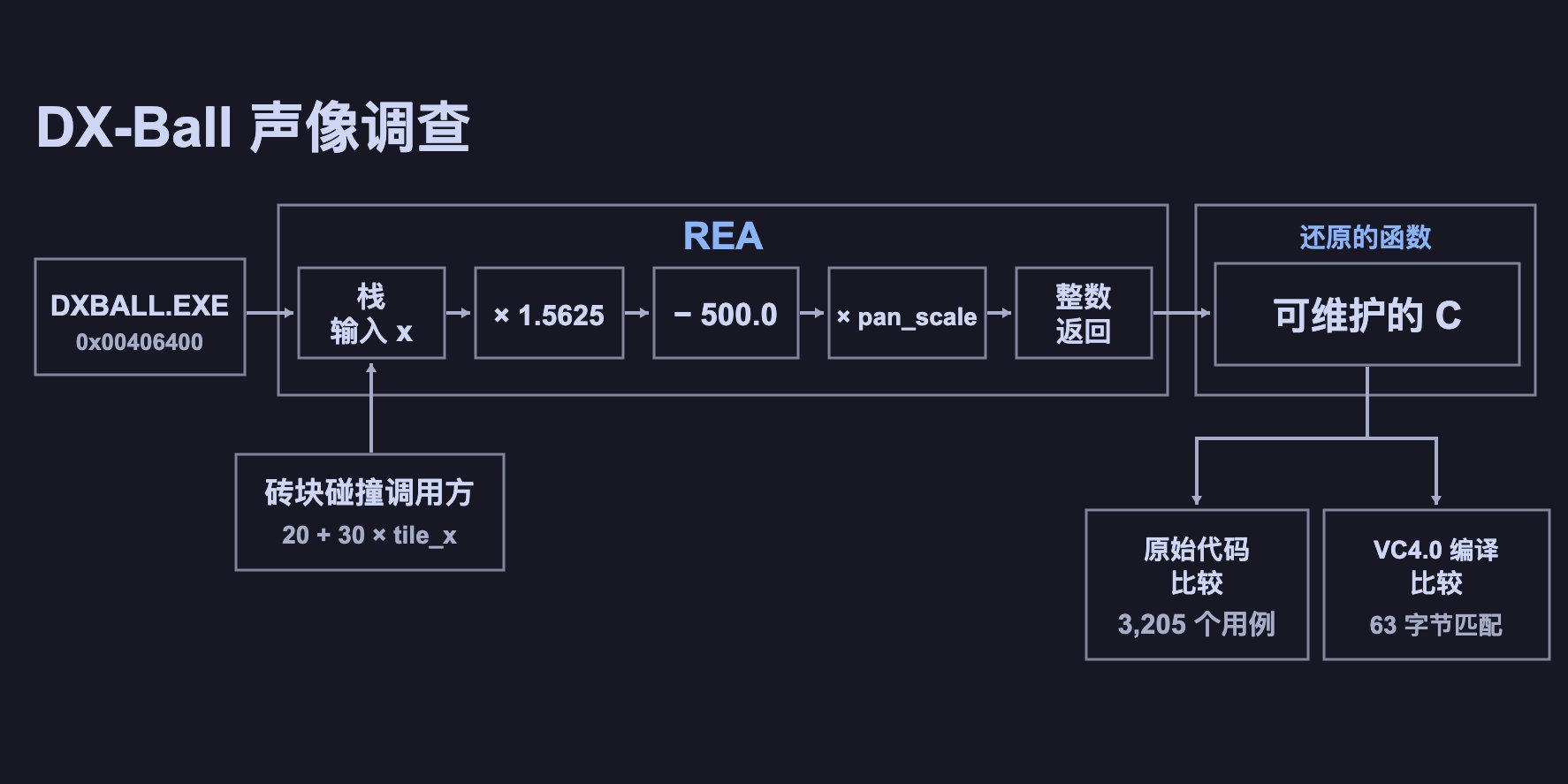
DX-Ball (1996 breakout). Community reconstruction recovered stereo sound-pan math; 3,205 = 641 × 5 behavior cases documented on this site. Full Evidence: /showcase/dx-ball/. Discovery twin: /blog/dx-ball-rea-discovery/.
Notion-class Electron clipboard path. Trace “copy” from renderer → preload bridge → main → system clipboard — living demo of the three-layer model in §5. Only on copies you may inspect.
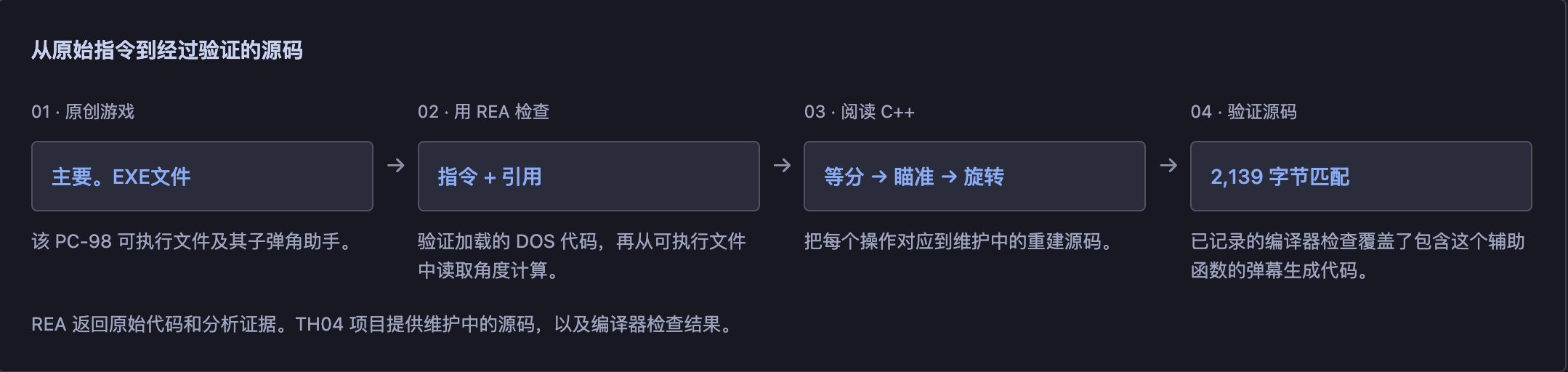
TH04 / PC-98 bullet-ring math. Shows how old and niche a BYO-engine target can be when you have rights and fixtures. Same lesson: specific calculation recovery, not vibes.
9. Pitfalls

- Forgot to restart the Agent — doctor checks files, not the live MCP session.
- Wrong Node band — 22.18, 23, 25 fail closed; check
node -vfirst. healthy: falsepanic — scope doctor to your client / provider.- One Approve click — npm and config are separate approvals; use
--dry-run. - Expecting original source — you get pseudocode and guessed names.
- Sensitive targets into model context — REA stays local; the LLM vendor policy still applies.
- Installing engines first — finish tier 1 before Hopper / Ghidra tuition.
- Relative paths — use absolute paths; on macOS stop at the
.appbundle when that is the entry. - Rights — authorization before curiosity (/faq/legal-boundary/).
10. FAQ

| Question | Short answer |
|---|---|
| Must I install Hopper or Ghidra? | No for JS / Electron / site / SQLite static work |
| Must Hopper be open already? | No — REA starts it when needed |
| Which Agents work? | Local-MCP clients; verified matrix on /docs/clients/ |
| Is output source code? | No — pseudocode / reconstructed facts |
| Does my software upload? | Not via REA; model vendor policy separate |
| Windows? | Agent side works; Ghidra on Windows is experimental in many notes; Hopper auto-install is Mac-oriented; Mac/Linux are primary |
| Upgrade / leftover junk? | See §3 update/uninstall — only REA-written bits are removed |
| Which version should teaching labs pin? | [email protected] on this site — /blog/rea-agents-6-5-0/ |
Closing checklist

- REA = MCP / CLI toolbox between Agents and Hopper / Ghidra / IDA
- Two words to keep straight: reverse engineering = open and inspect; MCP = hands for the model
- After install:
doctor --json→ restart Agent → engine-free command - Engines optional for tier 1
- Evidence + unknowns beat vibes
- Motto: finish engine-free first; always ask for Evidence
Agent one-liner many operators use after reading this page (still review every approval):
Install [email protected] with matching skills and MCP for my client,
prepare the supported Node/runtime, then help me analyze only targets I am authorized to inspect.
Repo: https://github.com/morluto/rea

Compliance
- Authorized / own / clean-room targets only. No crack, keygen, or DRM-bypass how-tos (/compliance/, /faq/legal-boundary/).
- Engines and companions (Hopper, Ghidra, IDA, JEB, Wireshark, …) are bring-your-own from official vendors.
- rea.run is a community operator guide; footer disclaimer stays as-is — we do not pile “Unofficial” into body titles.
- Primary CTAs stay on rea.run; GitHub is the tool repo footnote.
Sources
- Tool upstream: morluto/rea · npm
rea-agents· teaching pin 6.5.0 (release) - Star/fork snapshot: GitHub API 2026-10-16 (~275k★ / ~69k forks) — re-verify before citing
- On-site: /docs/install/ · /docs/install-demo/ · /docs/clients/ · /docs/breaking/ · /lab/ · /showcase/dx-ball/ · /blog/rea-agents-6-5-0/ · /blog/what-is-rea-reverse-engineer-anything/ · /compliance/
- Chinese twin: /zh/blog/rea-beginner-guide/